
Email Marketing Platforms: The Complete Guide
Table Of Contents
- What Is Email Marketing?
- How Does Email Marketing Work?
- When Should Businesses Use Email Marketing?
- Best Email Marketing Platforms Compared
- Understanding Email Marketing Pricing
- Why Boldinbox Stands Out in India
- How To Do Email Marketing
- Real-World Example: Campaign Performance Analysis
- Choosing The Right Email Provider
- Deliverability and Authentication
- How We Evaluate Email Marketing Platforms
- Conclusion
- FAQs
Email marketing platforms help businesses manage subscribers, send campaigns, automate communication and measure results. The best platform depends on your contact list size, monthly email volume, automation requirements, integrations, support needs and budget.
When comparing platforms, evaluate the actual subscription price, sending limits, overage charges, available features and billing terms. A low-cost plan may be enough for occasional newsletters, while businesses sending frequent campaigns may need higher allowances or more advanced automation.
This guide compares BoldInbox, Mailchimp, Brevo, MailerLite, Omnisend, Zoho Campaigns, EmailOctopus, GetResponse and other providers. It explains their pricing models, key differences, practical use cases and the factors to verify before choosing. Prices and plan conditions should be checked against each provider’s current official documentation before purchase.
What Is Email Marketing?
Email marketing is a digital marketing strategy that allows businesses to communicate with subscribers, customers and potential buyers by email. Businesses use it to share updates, promote products or services, nurture leads, announce offers and build long-term customer relationships.
An email marketing platform helps manage subscriber lists, create and schedule campaigns, automate messages, segment audiences and measure performance. Depending on the platform, you can also connect campaigns to your CRM, ecommerce store and other marketing tools.
How Does Email Marketing Work?
A typical process has five steps:
-
Build a permission-based subscriber list. Collect addresses through sign-up forms, enquiries, registrations and customer interactions, while keeping appropriate consent records.
-
Segment your audience. Organise subscribers by interests, purchase history, location, enquiry status or other relevant characteristics.
-
Create relevant campaigns. Write useful content, choose a clear subject line and include a specific call to action.
-
Send or automate emails. Schedule newsletters, promotions, welcome messages and follow-ups.
-
Measure and improve. Review delivery results, clicks, conversions, unsubscribes and complaints.
When Should Businesses Use Email Marketing?
Email marketing can support different objectives depending on the audience and the type of communication required:
-
Lead generation: Share useful information and follow up with prospects who have requested communication.
-
Customer retention: Keep existing customers informed about updates, new products and useful services.
-
Sales and promotions: Communicate offers, launches and seasonal campaigns to appropriate segments.
-
B2B marketing: Distribute industry insights, company updates, product information and lead-nurturing content.
-
Ecommerce marketing: Send order-related communications, product recommendations and promotions, subject to applicable consent and communication requirements.
For example, a travel company could share destination guides with new enquiries, seasonal holiday packages with past travellers and inventory updates with travel-agent partners. Sending relevant messages to each audience lets the company measure outcomes such as clicks, qualified enquiries and bookings.
Best Email Marketing Platforms Compared
The table shows how each platform prices and counts sending, because that distinction changes your real cost. On a contact-based plan, you pay for the size of your list; on a volume-based plan, you pay for the emails you send; many vendors combine both. The descriptions are suitability notes, not a ranked or independently tested verdict.
|
Platform |
Best for |
Pricing basis |
How sending is counted |
Main strengths |
Official pricing |
|
Boldinbox |
Businesses sending recurring campaigns |
Contact-based |
Priced by contacts stored; confirm sending terms and fair-use conditions |
Contact management, campaign creation and reporting |
|
|
Mailchimp |
Businesses needing a broad marketing ecosystem |
Plan- and contact-based |
Monthly send allowance set by plan; check it against your list size and frequency |
Integrations and marketing automation |
|
|
Brevo |
Businesses needing multichannel communication |
Volume-based |
Tiers cap monthly sends; the cap, not list size, drives the price |
Email, SMS and other channels |
|
|
MailerLite |
Small teams and regular newsletters |
Subscriber-based with send caps |
Comfort caps sends at 10 times the subscriber tier; Power advertises unlimited monthly emails |
Campaign creation and automation |
|
|
Omnisend |
Ecommerce businesses |
Contact-based with email credits |
Standard includes email credits equal to 12 times the contact count; Pro advertises unlimited emails |
Ecommerce marketing workflows |
|
|
Zoho Campaigns |
Businesses using Zoho applications |
Three models: subscriber-based, email-based, pay-as-you-go |
Subscriber-based plans allow unlimited emails to the tier’s contacts; the other two meter sends |
Integration with the Zoho ecosystem |
|
|
EmailOctopus |
Businesses seeking straightforward email marketing |
Subscriber tier plus sending allowance |
Pro tiers set both a contact limit and a monthly email allowance |
Email campaign management |
|
|
GetResponse |
Businesses needing email plus broader marketing tools |
Subscriber-based |
Monthly plans advertise unlimited sends; billing rises when contact thresholds are exceeded |
Email marketing and additional marketing features |
Understanding Email Marketing Pricing
Contact-based and sending-volume pricing are not directly equivalent. A contact-based plan may charge according to the number of stored subscribers, while another plan may cap monthly sends or charge by usage. Free tiers may also restrict automation, reporting, support or other features.
Consider a business with 10,000 subscribers. Sending four campaigns to the entire list requires 40,000 email sends; sending 20 requires 200,000. The same contact count can therefore produce very different costs.
Before comparing prices, check the contacts included, monthly sending allowance, overage charges, billing cycle and feature restrictions.
Pricing comparison
The figures below were checked against official vendor pricing information. They are entry-level or example prices in USD, not like-for-like quotes.
|
Provider |
Official pricing information |
Notes |
|
Boldinbox |
$14/month for up to 1,000 contacts; $50/month for up to 10,000 contacts |
Contact-based pricing. Confirm sending terms and fair-use conditions on the Boldinbox pricing page. |
|
Brevo |
Free plan available; Starter from $9/month |
Sending allowances depend on the selected tier. |
|
MailerLite |
Comfort from $12/month; Power from $25/month |
The applicable price depends on subscriber count and billing frequency. |
|
Mailchimp, Omnisend, Zoho Campaigns, EmailOctopus, GetResponse |
See each provider’s official pricing page |
Prices vary by contact count, plan, sending allowance and billing period. Use each vendor’s calculator for your own numbers. |
Pricing methodology: Vendors use different structures, including subscriber-based plans, monthly email allowances and usage-based credits, so prices are comparable only when the plan, sending allowance and billing period match. Taxes, currency conversion, overage charges and fair-use restrictions may apply. Where a vendor uses a dynamic pricing calculator, confirm the exact price for your contact tier and billing frequency on the official page.
Why Boldinbox Stands Out in India
Boldinbox is an option for businesses evaluating contact-based pricing and flexibility for recurring email campaigns. Its published pricing page lists $14 per month for up to 1,000 contacts and $50 per month for up to 10,000 contacts. Confirm the current price, billing terms, sending allowances and conditions on the Boldinbox pricing page before purchasing.
Contact-based pricing can make budgeting easier for businesses that send frequently, but total value depends on the plan’s actual limits, features and fair-use conditions. A large contact allowance alone does not make a platform suitable for every campaign.
A travel business may need to reach past travellers, new enquiries and travel-agent partners throughout the year. A B2B company may send regular newsletters, product updates and lead-nurturing emails. Both need an organised contact database, relevant segments and reliable reporting.
Boldinbox may suit businesses looking for straightforward contact management, email campaign creation and campaign reporting. Before choosing a plan, compare your contact-list size, expected sending frequency, required features and support needs with the available plan conditions.
How To Do Email Marketing
-
Define the objective. Decide whether the campaign should generate enquiries, encourage repeat purchases, announce a product or nurture prospects. Choose a measurable outcome before writing.
-
Build a permission-based list. Collect addresses through appropriate forms, registrations and customer interactions. Keep consent records, remove invalid addresses and honour unsubscribe requests. Avoid purchased lists and unsolicited bulk campaigns.
-
Segment the audience. Use interests, purchase history, enquiry status or business role to make messages more useful.
-
Create and schedule relevant content. Write a clear subject line, provide a useful message and include a specific call to action. Test links, rendering and personalisation before sending.
-
Measure and improve. Review delivery results, clicks, conversions, unsubscribes and complaints, rather than judging success by opens alone.
A practical example: email marketing for a travel business
Consider a travel company with 30,000 subscribers. Instead of sending every promotion to everyone, it could create three segments:
-
New enquiries: destination guides, itinerary details and introductory offers.
-
Past travellers: seasonal packages and suitable repeat-booking offers.
-
Travel-agent partners: new inventory, commission updates and partnership announcements.
It could then compare clicks, qualified enquiries, bookings and unsubscribes across segments. This is an illustrative workflow, not a claim about a particular Boldinbox customer’s results.
Real-World Example: Campaign Performance Analysis
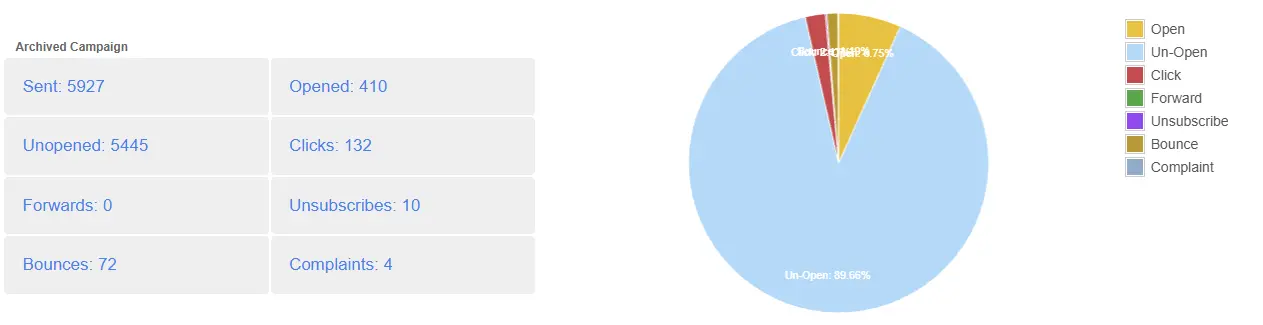
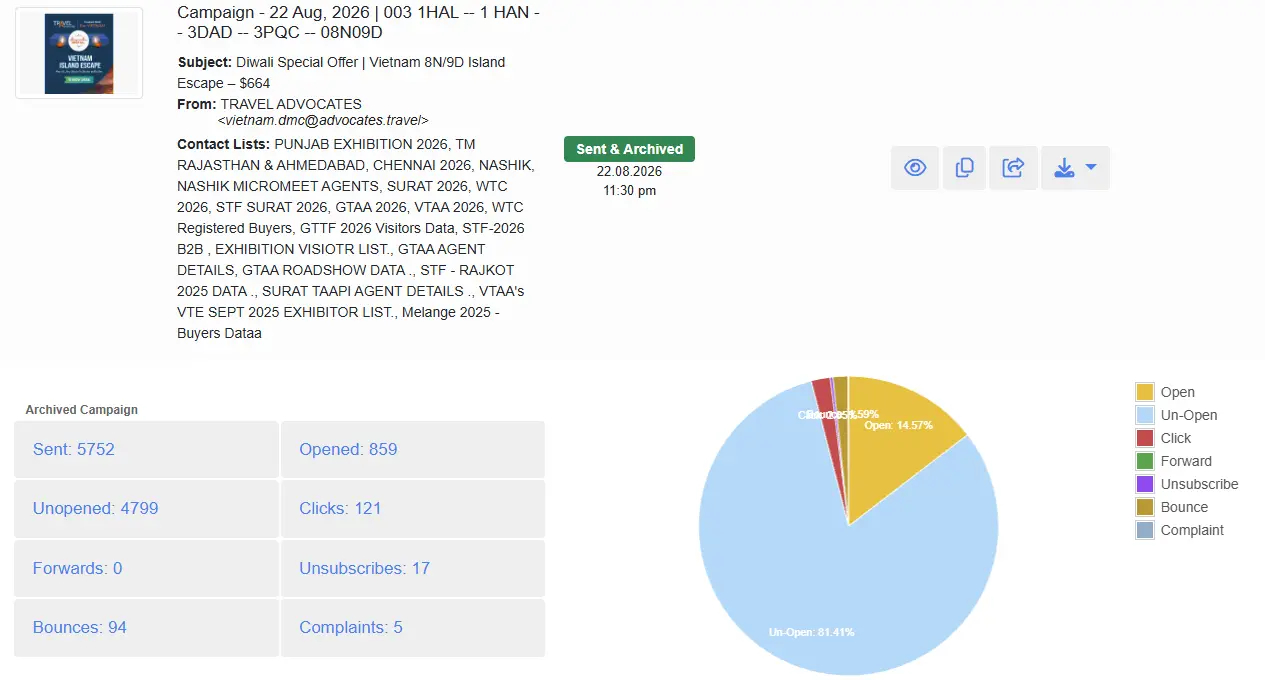
Advocates Travel – Boldinbox User Campaign Statistics
Campaign reporting shows more than how many emails you sent. It gives visibility into engagement, clicks, bounces, unsubscribes and complaints, which can inform future decisions.
For example, an archived Boldinbox campaign report records 5,752 emails sent, 859 opens, 121 clicks, 94 bounces, 17 unsubscribes and 5 complaints.
Campaign operations also involve technical preparation. In a Google review, Boldinbox customer Sunil Puhal praised the team for helping launch a mail campaign, update a contact list and make DNS changes. This highlights the practical role onboarding and domain configuration play in getting a campaign ready to send.
Practical takeaway: Evaluate a platform’s reporting capabilities as well as the technical setup and support needed to run campaigns effectively.
The two Boldinbox campaign reports below, both from October 2026, show how these metrics can be used in practice.
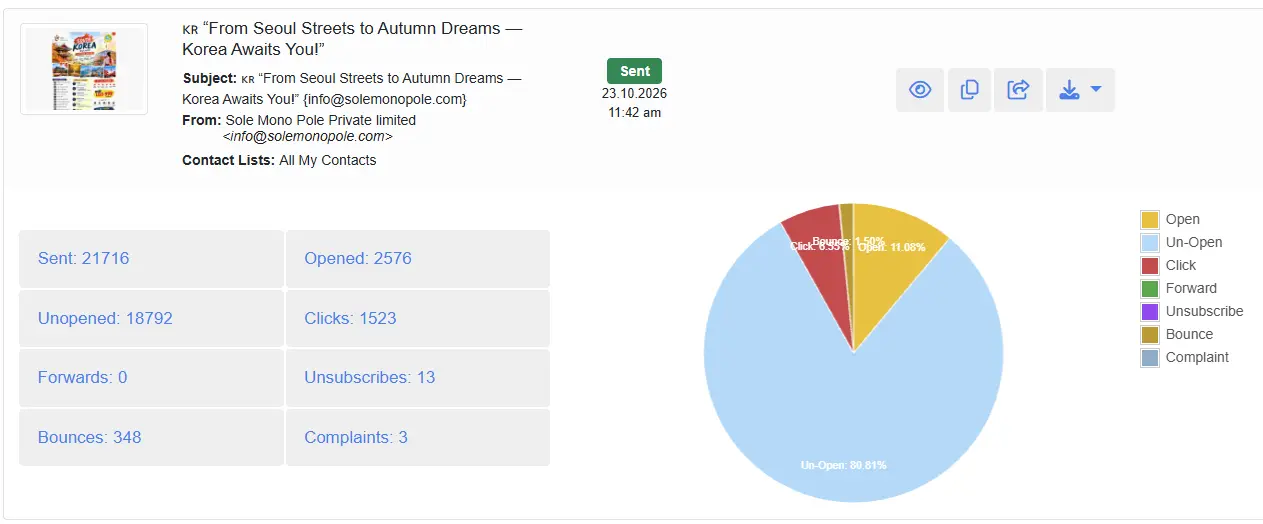
Campaign 1: From Seoul Streets to Autumn Dreams - Korea Awaits You!
- Emails sent: 21,716
- Opens recorded: 2,576
- Clicks recorded: 1,523
- Bounces: 348
- Unsubscribes: 13
- Complaints: 3
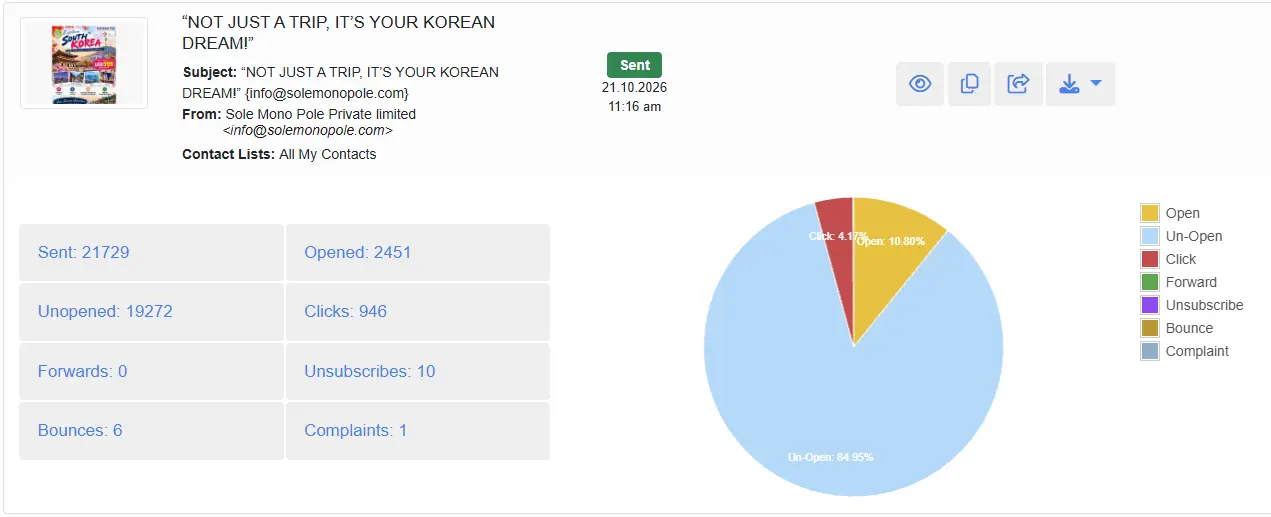
Campaign 2: Not Just a Trip, It’s Your Korean Dream!
- Emails sent: 21,729
- Opens recorded: 2,444
- Clicks recorded: 946
- Bounces: 6
- Unsubscribes: 10
- Complaints: 1
What do these campaign results tell us?
The first campaign recorded 576 more clicks than the second despite similar sending volumes. The second recorded far fewer bounces, unsubscribes and complaints. Expressed as rates:
|
Metric |
Campaign 1 |
Campaign 2 |
|
Recorded click rate |
7.01% |
4.35% |
|
Bounce rate |
1.60% |
0.03% |
|
Unsubscribe rate |
0.06% |
0.05% |
|
Complaint rate |
0.014% |
0.005% |
Rates use emails sent as the denominator and are rounded.
These figures highlight differences in recorded engagement and delivery-related outcomes, but they do not establish the reasons behind those differences. Audience composition, list quality, campaign content and tracking methods may all influence the results. Recorded clicks may also include automated activity, so campaign performance should be evaluated alongside conversions and other relevant business outcomes.
When comparing campaigns, consider:
-
Engagement: Compare clicks and other indicators, accounting for audience size and measurement methods.
-
Delivery performance: Investigate bounces to find invalid addresses, outdated contacts or other delivery issues.
-
Audience relevance: Check whether content and offer match the recipients’ interests.
-
Subscriber experience: Monitor unsubscribes and complaints for signs of relevance or frequency problems.
-
Conversion outcomes: Where tracking is available, evaluate enquiries, bookings and revenue rather than relying on opens and clicks.
Also verify how the platform defines opens, clicks and bounces. Recorded opens can be affected by privacy features and automated image loading.
Choosing The Right Email Provider
Start by estimating your contact database, expected sending frequency, required integrations, technical resources and budget. Then compare providers against the same requirements rather than choosing on price or feature count alone.
An email marketing platform provides software for managing lists, designing campaigns and measuring results. An agency can plan or run campaigns for you. An in-house team using an external platform keeps direct operational control but needs time and expertise. These approaches can be combined.
Essential features usually include contact management, segmentation, unsubscribe handling, campaign scheduling, reporting and domain authentication support. Advanced automation, CRM integrations, team permissions and e-commerce workflows matter depending on the business.
Deliverability and Authentication
Server acceptance is not the same as inbox placement: an email can be accepted by a receiving server and still land in spam. No sending allowance or platform can guarantee inbox placement.
Domain authentication is a core part of responsible sending:
-
SPF identifies the mail servers authorised to send emails using a domain name.
-
DKIM uses a digital signature to help receiving servers verify that an email is authentic.
-
DMARC defines how receiving servers should handle emails that fail authentication and enables reporting on authentication results.
Review the official guidance from Google, Yahoo Sender Hub and Microsoft. Requirements differ by sender type and volume, so check the current rules that apply to your business.
How We Evaluate Email Marketing Platforms
We evaluate platforms on five practical factors: pricing structure, subscriber management, campaign sending allowances, automation capabilities and technical support. We consider pricing for lists of 1,000 and 10,000 subscribers to illustrate how costs change as a business grows.
The comparison is based on publicly available vendor pricing pages and product documentation, unless direct testing is explicitly identified. We have not represented every platform as independently tested. Boldinbox is our own product and is included transparently alongside competing providers.
Prices, features and sending limits can change. Before choosing a provider, verify current plan details, billing terms, contact limits and email allowances on the vendor’s official website. Advertised unlimited sending does not guarantee inbox placement or successful delivery.
Conclusion
The right platform should match your audience, campaign frequency, budget and technical requirements. BoldInbox is worth evaluating if its contact-based pricing and stated sending flexibility fit your needs; other providers may suit particular integrations or specialised workflows. Compare current plans, test the actual workflow and verify support and authentication requirements before committing.
FAQs
How many emails can I send to 10,000 contacts?
It depends on your platform’s monthly sending allowance and plan conditions. Four campaigns to all 10,000 contacts require 40,000 sends, while 20 campaigns require 200,000. Check the provider’s limits and how it counts usage.
Is contact-based pricing better than email-volume pricing?
Contact-based pricing can be easier to budget for when you maintain a consistent subscriber database, while email-volume pricing may suit predictable sending needs. Compare total cost at your expected contact count and campaign frequency, including overage charges and feature restrictions.
What should businesses check before switching email marketing platforms?
Review subscriber-data export options, consent records, suppression lists, templates, automation workflows, integrations and reporting requirements. Authenticate your sending domain with the new provider and follow its migration guidance before moving campaigns.
Can an email marketing platform guarantee inbox placement?
No. Inbox placement depends on sender reputation, authentication, list quality, recipient engagement, message characteristics and receiving-provider policies.
Table Of Contents
- What Is Email Marketing?
- How Does Email Marketing Work?
- When Should Businesses Use Email Marketing?
- Best Email Marketing Platforms Compared
- Understanding Email Marketing Pricing
- Why Boldinbox Stands Out in India
- How To Do Email Marketing
- Real-World Example: Campaign Performance Analysis
- Choosing The Right Email Provider
- Deliverability and Authentication
- How We Evaluate Email Marketing Platforms
- Conclusion
- FAQs