
Affordable Email Marketing: A Smart Guide
Every startup faces the same problem when it comes to email marketing: “Which email marketing platform should I choose, and what actually fits my business?”
Once that question comes up, the search usually begins. Startups start comparing the best, top, and trending email marketing tools, checking pricing, features, contact limits, automation, and reviews. But with so many platforms promising to be the right choice, figuring out which one genuinely fits your business can quickly become confusing.
The biggest mistake is choosing a platform based only on the price you see on the pricing page. The sticker price is rarely the real price. As your contact list grows, sending volume increases, automation needs become more advanced, and essential features move behind higher-tier plans, your actual costs can change significantly.
That’s exactly where this guide will help.
Instead of simply listing the “best” email marketing platforms, we’ll break down what affordability really means for a startup-from platform costs and feature limitations to the hidden expenses that appear as your business scales. We’ll compare five platforms startups commonly consider: Boldinbox, Mailchimp, Brevo, Constant Contact, and HubSpot.
By the end, you’ll have a clearer framework for choosing an email marketing platform based not only on what your business needs today, but also on what it may need when your audience reaches 5,000 or even 25,000 contacts.
How Can You Build an Affordable Email Strategy?
An affordable email strategy starts with a clear picture of what the business needs the channel to do, not with a list of platforms. Startups that shop for tools before defining goals tend to overbuy features they won't touch for a year, or underbuy and hit a paywall the moment their list crosses a few thousand contacts.
Set Startup Email Marketing Goals
Startup email goals usually fall into three buckets: activating new users or customers, nurturing leads that aren't ready to buy, and retaining people who already converted. A SaaS company mostly cares about trial activation and churn reduction. An ecommerce startup cares about cart recovery and repeat purchases. A B2B startup cares about lead nurturing and sales handoff.
Naming the goal first changes the buying decision. A platform with weak automation might be fine for a founder sending a monthly newsletter, but it's the wrong choice for a company that needs behavior-triggered onboarding sequences. Write down the two or three jobs email needs to do in the next two quarters before comparing any pricing pages.
Choose Costs That Scale
Email platforms generally price their plans around either your contact count or your sending volume, and the difference matters more than most founders expect. Contact-based pricing (used by Mailchimp, Constant Contact, and HubSpot) charges more as your list grows, regardless of how often you email. Volume-based pricing (used by Brevo) charges based on how many emails go out each month, regardless of list size.
A startup with a large but rarely emailed list-for example, a 20,000-person waitlist that receives one update a month-may do better with volume-based pricing. A startup that emails an active, engaged list frequently will often find contact-based pricing more predictable. Boldinbox uses flat contact-tier pricing with no separate send cap, which suits startups that send often and don't want to track a monthly email quota on top of a contact count.
Prioritize Essential Campaign Features
Not every feature on a pricing page matters to a five-person startup. The features worth paying for early are: basic automation (welcome sequences, at minimum), list segmentation, mobile-responsive templates, and analytics that show opens, clicks, and conversions at the campaign level. Multi-step branching automation, predictive send-time optimization, and advanced A/B testing are useful later, but they're rarely the reason a startup's first year of email marketing succeeds or fails.
A useful test: if a feature wouldn't change what you send this month, it doesn't need to influence which plan you buy this month.
Avoid Unnecessary Marketing Expenses
The easiest way to overspend on email marketing as a startup is to buy for the team you hope to have in eighteen months. Extra user seats, multiple audiences, dedicated IP addresses, and enterprise reporting all add cost without adding results for a small team. Several platforms - HubSpot and Constant Contact among them - also charge separately for extra contacts, extra sends, and SMS add-ons, so a plan that looked affordable at signup can grow a second and third line item within a few months.
Before upgrading, ask whether the trigger is a genuine feature gap or simply hitting a contact ceiling. If it's the latter, compare what the next tier costs against what a different platform charges for the same contact count - sometimes staying is cheaper, sometimes switching is.
Which Five Email Platforms Are Most Affordable?
Startups researching affordable email marketing usually shortlist a mix of budget-focused newer entrants and established names. Below is an honest look at five: Boldinbox, Mailchimp, Brevo, Constant Contact, and HubSpot.
Boldinbox: Strengths, Weaknesses, Pricing
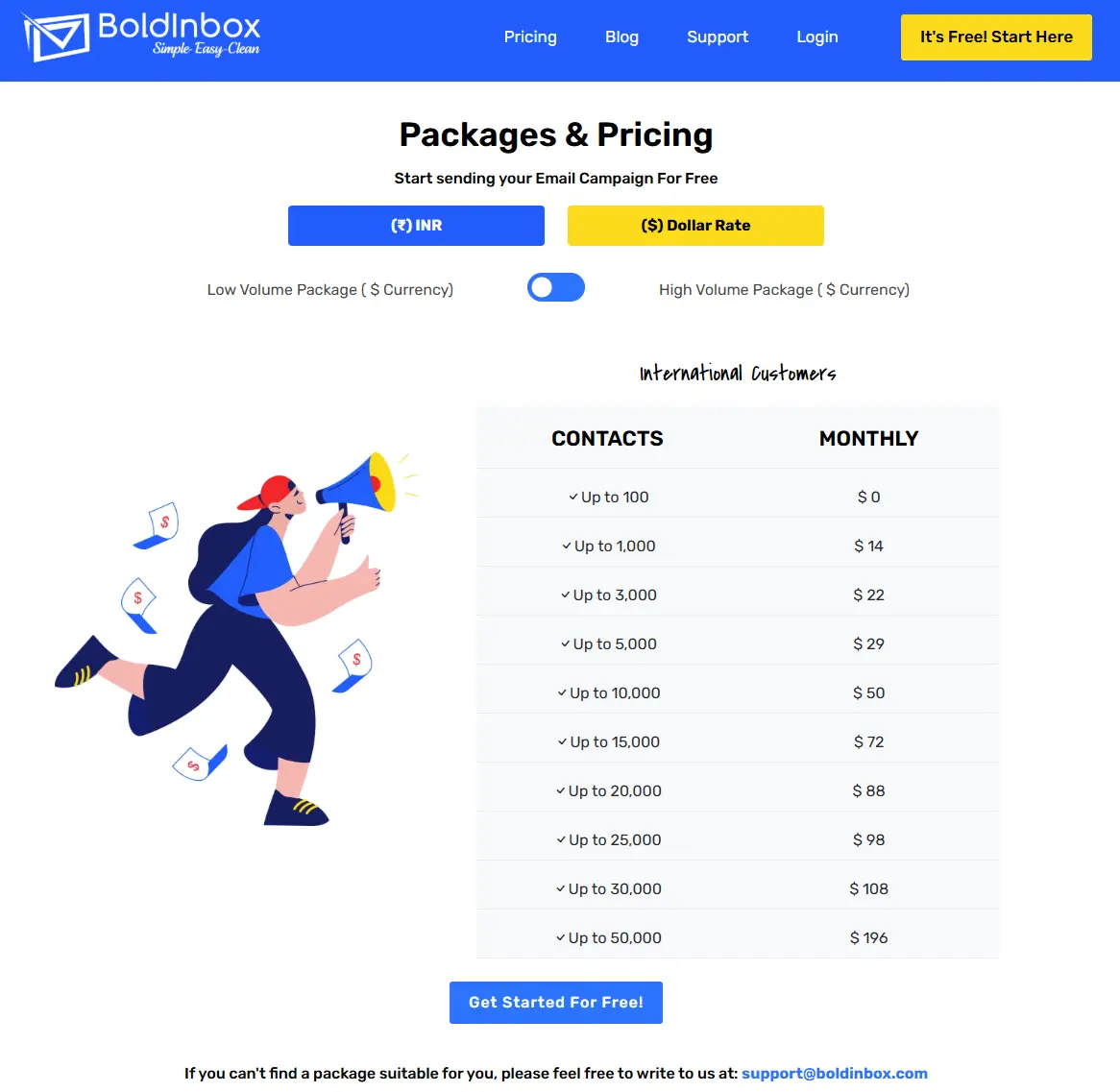
Boldinbox is a newer, India-based email marketing platform built around flat, contact-tier pricing with no separate monthly send cap on its paid plans. Its free plan covers 100 contacts with unlimited sending, and paid plans start at roughly $14 per month (around ₹990) for 1,000 contacts. The platform includes AI-assisted subject lines, segmentation, and - through its affiliated agency arm - optional SMS and WhatsApp marketing.
Strengths: Straightforward flat pricing without a separate send-volume limit, a genuinely usable free tier, and multichannel add-ons through its agency arm for startups that want SMS or WhatsApp alongside email.
Weaknesses: As a newer platform, it has a smaller independent track record and fewer third-party reviews than the established names on this list. It does not yet offer native integrations with platforms like Shopify or WooCommerce, so ecommerce startups needing plug-and-play storefront syncing will need to weigh that gap. Advanced automation and template sophistication are more limited than platforms like Brevo or HubSpot at their higher tiers.
Best for: Startups - particularly B2B, travel, and high-volume senders - that want predictable flat pricing without worrying about hitting a monthly send ceiling, and that don't need deep native ecommerce integrations on day one.
Google Reviews I Trustpilot Reviews
Why Affordable Email Marketing Is Boldinbox.
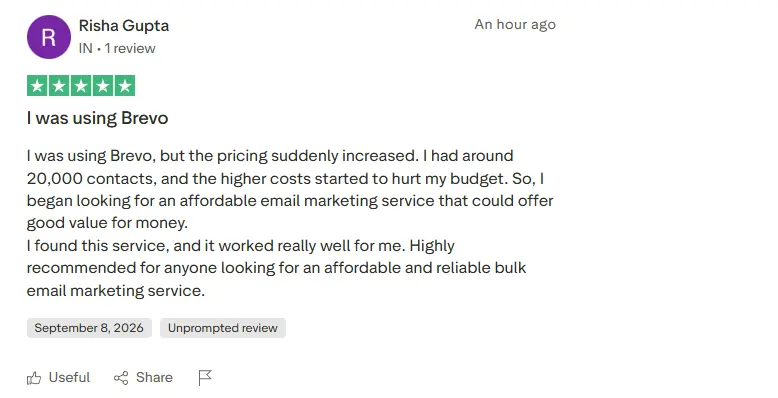
Why People Choose Boldinbox.
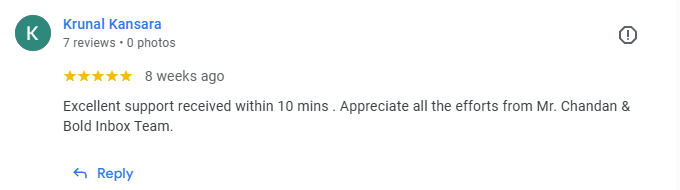
Review: Excellent support received within 10 mins . Appreciate all the efforts from Mr. Chandan & BoldInbox Team.
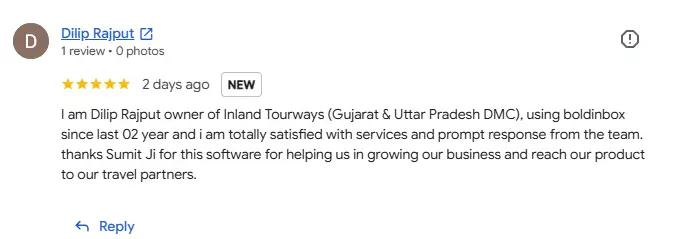
Review: I am Dilip Rajput owner of Inland Tourways (Gujarat & Uttar Pradesh DMC), using boldinbox since last 02 year and i am totally satisfied with services and prompt response from the team. thanks Sumit Ji for this software for helping us in growing our business and reach our product to our travel partners.
Mailchimp: Strengths, Weaknesses, Pricing
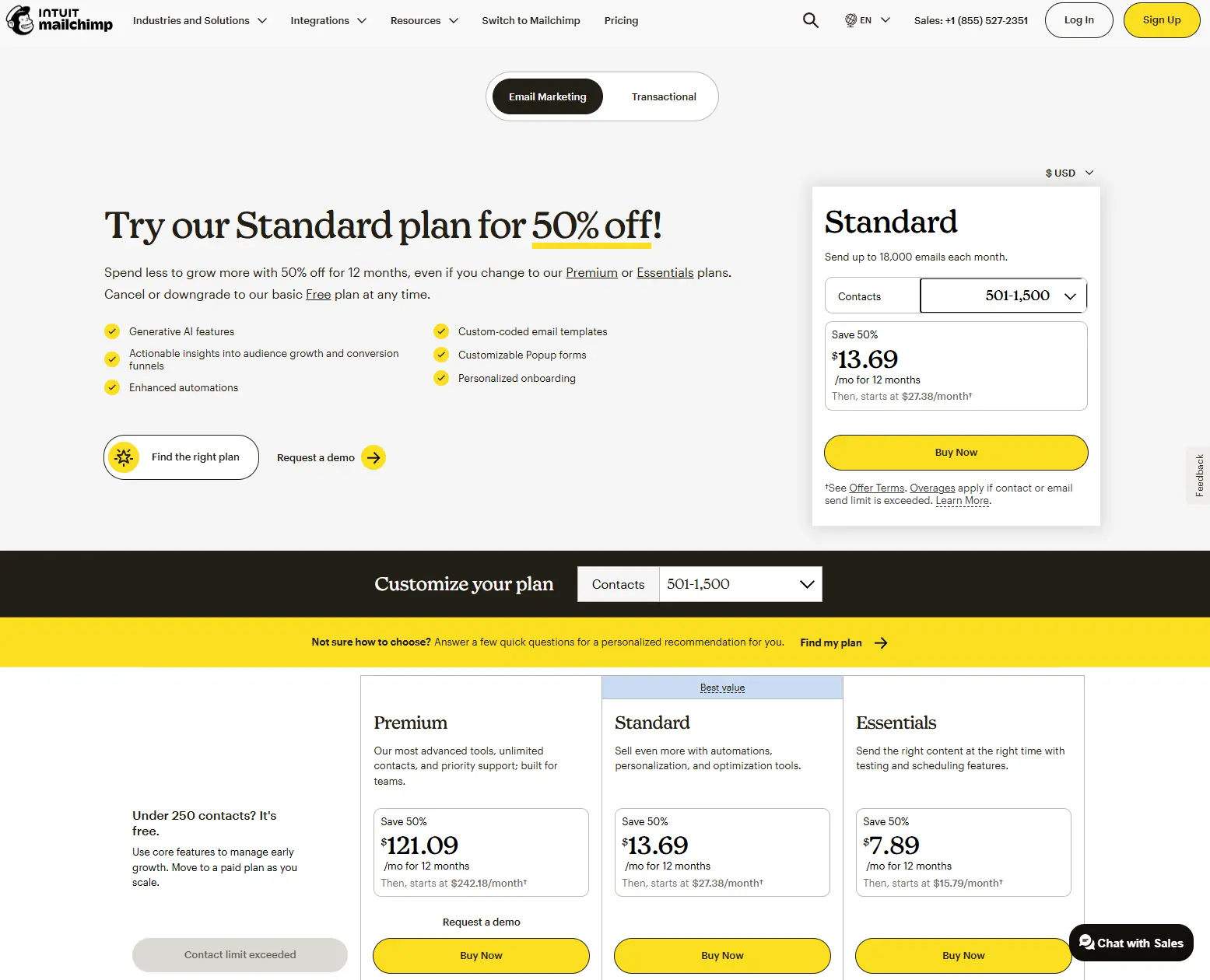
Mailchimp remains the most recognized email platform for small businesses. As of 2026, its free plan covers 250 contacts and 500 monthly sends with a 250-per-day cap. The Essentials plan starts at $13 per month for 500 contacts and 5,000 monthly sends. Standard starts at $20 per month for 500 contacts and adds multi-step automation, predictive segmentation, and generative AI tools. Premium starts around $350 per month.
Strengths: A large integration ecosystem, familiar interface, strong template library, and broad brand recognition that makes hiring or onboarding easier.
Weaknesses: Mailchimp's free plan has been reduced twice in 2026 and is now cramped for anything beyond testing. Pricing counts total contacts, including unsubscribed ones, and multi-step automation is locked behind the Standard plan - a meaningful jump for a startup that needs abandoned-cart flows or lead-nurture sequences from day one.
Best for: Startups that want a widely-supported, general-purpose platform and are comfortable paying for automation once their list is established.
Brevo: Strengths, Weaknesses, Pricing
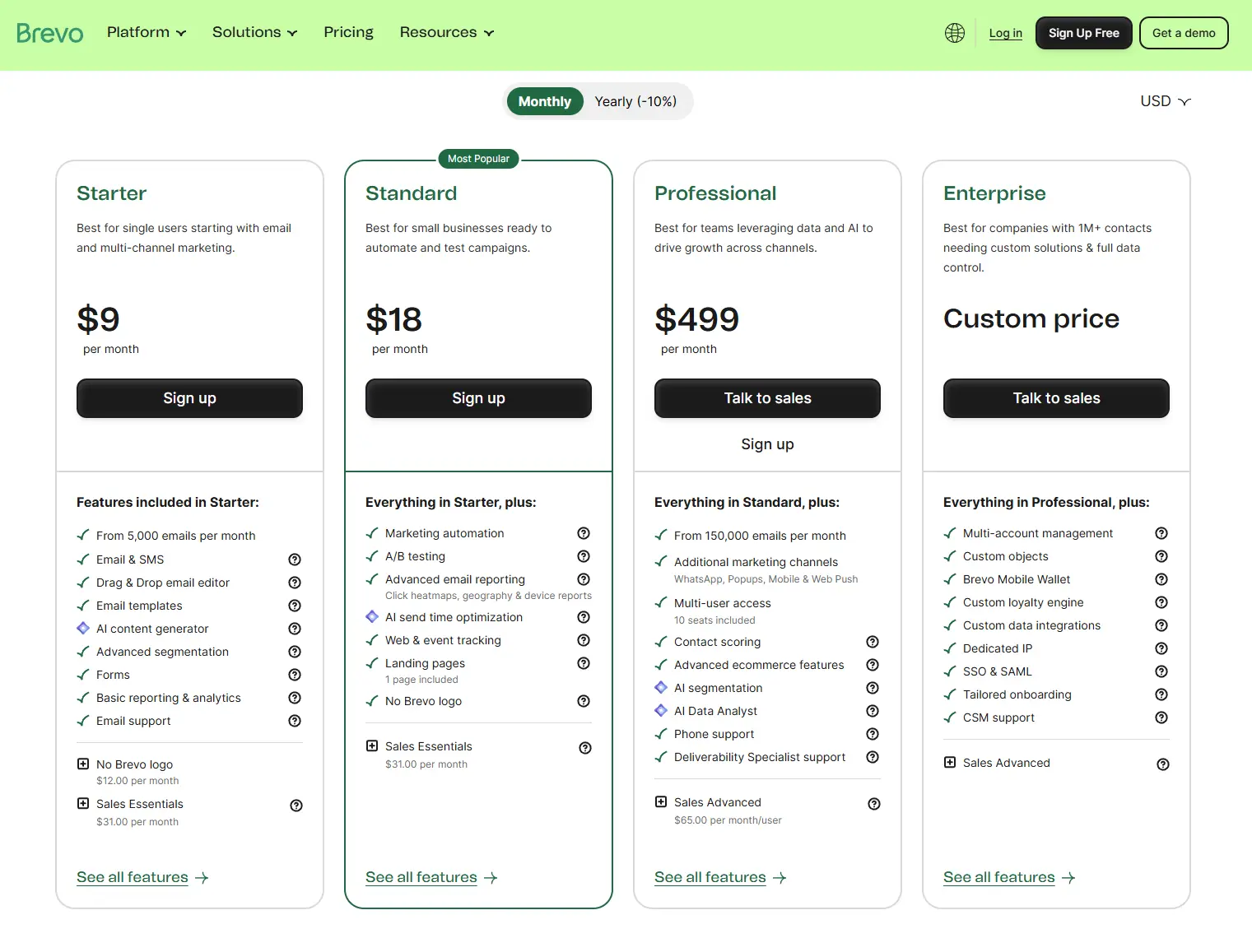
Brevo (formerly Sendinblue) prices by monthly email volume rather than contact count, and its free plan is unusually generous: roughly 300 emails per day (about 9,000 per month) with a large stored-contact allowance. Paid Starter plans begin around $9 per month for 5,000 emails, scaling to about $29 for 40,000 and roughly $65–$69 for 100,000. The Business tier, which unlocks marketing automation and A/B testing, starts around $18 per month.
Strengths: Send-based pricing rewards startups with large but infrequently-emailed lists, the free plan is genuinely usable for early testing, and built-in SMS and WhatsApp reduce the need for separate tools.
Weaknesses: Automation is gated behind the Business tier, not included in Starter. Removing Brevo's branding requires an add-on. For startups that send frequently to an active, growing list, the send-volume model can become less predictable than flat contact pricing.
Best for: Startups with a large contact base that email in bursts rather than constantly - think product-led companies with big waitlists, or B2B companies sending a monthly digest to thousands of leads.
Constant Contact: Strengths, Weaknesses, Pricing
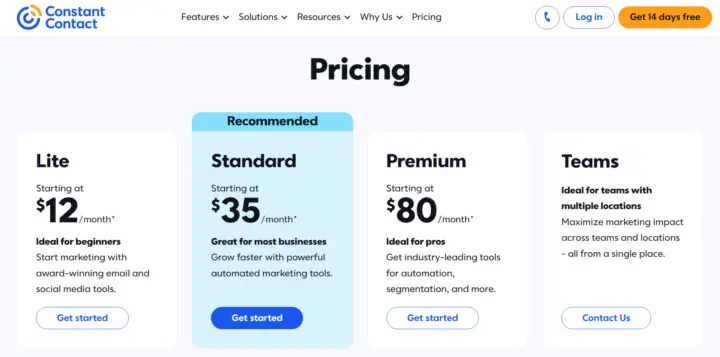
Constant Contact is one of the oldest players in the category, with three tiers priced at a 500-contact baseline: Lite at $12 per month, Standard at $35 per month, and Premium at $80 per month. There is no permanent free plan, only a short free trial. Each tier ties its monthly send allowance to contact count (roughly 10x on Lite, 12x on Standard, 24x on Premium), with overage billed at about $0.002 per email.
Strengths: Long operating history, phone support even on lower tiers, and event and nonprofit-friendly features like ticketing and social integrations.
Weaknesses: No free plan, thinner automation than competitors until the Standard tier, and pricing that climbs steeply as contact count grows - the jump from 500 to a few thousand contacts noticeably increases the bill on every tier.
Best for: Startups and small organizations, including nonprofits and event-driven businesses, that value phone support and don't need deep, branching automation.
HubSpot: Strengths, Weaknesses, Pricing
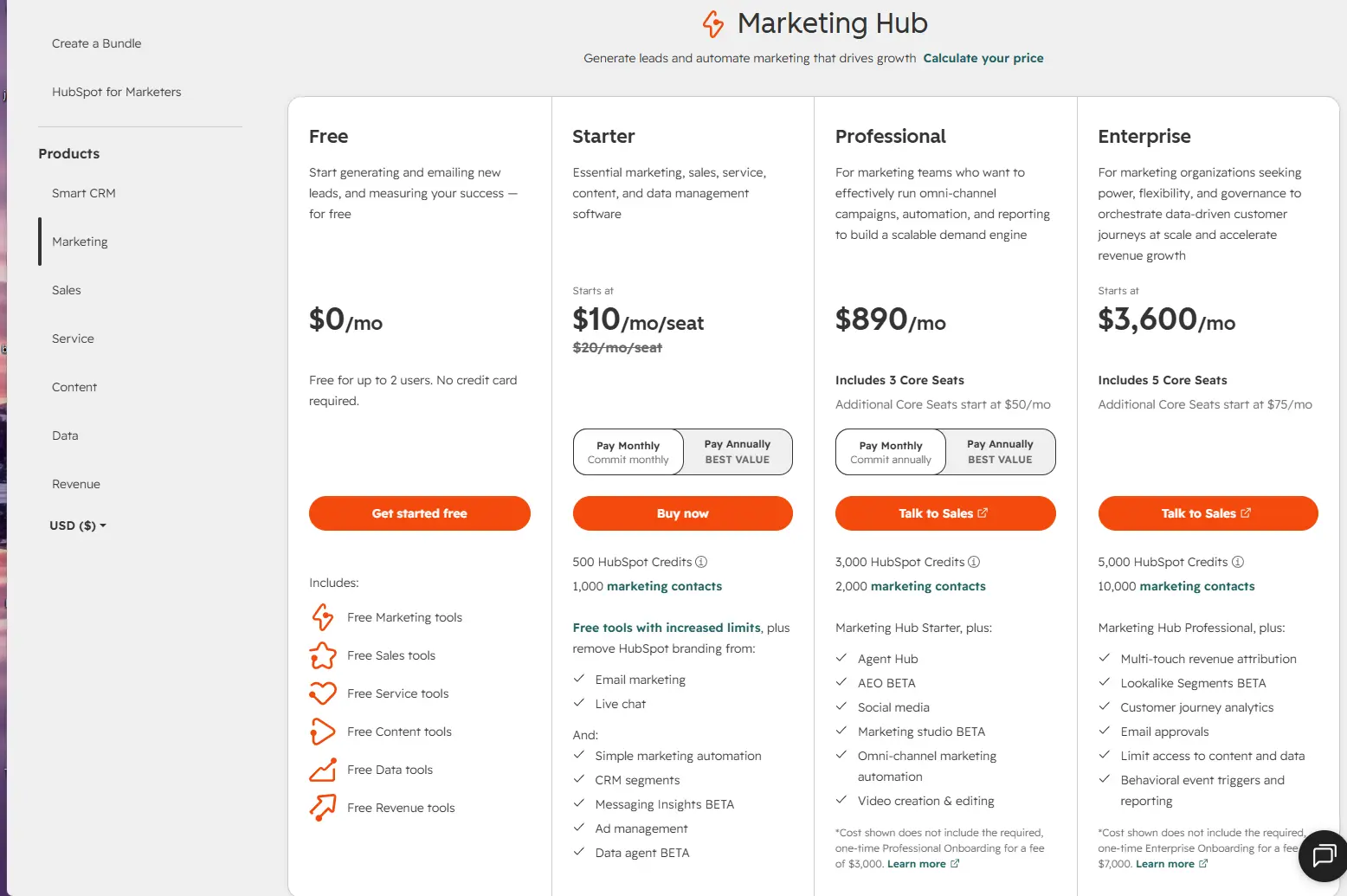
HubSpot's Marketing Hub is part of a broader CRM suite. A free tier includes basic email marketing, forms, and live chat with HubSpot branding, capped around 2,000 sends and 100 marketing contacts. Starter runs roughly $15–$20 per month (per seat, often billed annually) for around 1,000 marketing contacts and removes branding. Professional jumps sharply to roughly $890 per month for about 2,000 contacts and typically requires a one-time onboarding fee in the thousands of dollars. Additional marketing contacts are billed in blocks on top of the base price.
Strengths: A genuinely useful free CRM that unifies marketing, sales, and support data, which matters for startups planning to scale beyond email into a full go-to-market stack.
Weaknesses: The gap between Starter and Professional is the steepest in this comparison, and the mandatory onboarding fee on higher tiers is a real budget line, not a formality. For a startup that only needs email, HubSpot is rarely the cheapest way to get it.
Best for: Startups that plan to run marketing, sales, and support from one connected system and can justify the cost of Professional once they outgrow Starter - not startups that only need a newsletter tool.
Compare 5 Affordable Email Marketing Platforms for Startups
|
Platform |
Pricing Model |
Startup Strength |
Key Features |
Main Limitation |
Best For |
|
Flat, contact-tier |
Predictable flat cost, no send cap |
AI subject lines, segmentation, SMS/WhatsApp add-ons with Multiplatsystems |
Limited native ecommerce integrations; newer track record |
High-volume senders wanting flat, predictable pricing |
|
|
Contact-based |
Wide recognition, big ecosystem |
Templates, integrations, generative AI on Standard+ |
Automation locked behind Standard; free plan is thin |
General-purpose startups wanting broad tool support |
|
|
Send-volume-based |
Generous free plan, SMS/WhatsApp included |
Automation (Business tier), transactional email |
Automation not on Starter; send-based cost less predictable at scale |
Large lists emailed infrequently |
|
|
Contact-based |
Long track record, phone support |
Event tools, social integrations, A/B testing (Standard+) |
No free plan; steep scaling cost |
Nonprofits, event-driven small businesses |
|
|
HubSpot |
Contact-based, tiered by Hub |
Full CRM integration |
Marketing + sales + service data in one system |
Steep Starter-to-Professional jump; onboarding fees |
Startups building a full CRM-based go-to-market stack |
Measure Pricing Against Startup Needs
The "cheapest" platform on paper is only cheap if it covers what the startup actually needs to send. A $9 Brevo Starter plan that lacks automation isn't cheaper than an $18 plan with automation if the business loses revenue from abandoned carts it can't automatically recover. Match each platform's gated features - automation, segmentation depth, integrations - against the two or three jobs identified earlier, then compare price only among platforms that clear that bar.
Calculate Your Email Marketing Costs
Affordability is a moving number, not a fixed one. A plan that costs $13 a month at 500 contacts can cost several times that at 10,000 contacts, and the rate of increase differs sharply by platform.
Understand Contacts And Sending Volume
Contact-based platforms (Mailchimp, Constant Contact, HubSpot, Boldinbox) price primarily on list size. Send-volume platforms (Brevo) price primarily on how many emails go out per month. A startup should estimate both numbers - expected list size at the end of the year, and expected sends per month - before comparing plans, because the cheaper model depends entirely on which number grows faster.
Compare Plans By Features
Two plans at the same price point can offer very different value. Mailchimp Essentials at $13 per month includes no multi-step automation; Boldinbox's comparable tier includes unlimited sending at a similar price point. Line up the features each plan unlocks - not just the headline price - before ranking platforms as "cheap" or "expensive."
Account For Hidden Marketing Costs
The advertised monthly fee is rarely the full cost of running email marketing. A more complete way to think about the real number is:
Total Cost = Platform Cost + Required Features + Contact Growth + Sending Volume + Design/Creative Costs + Integration Costs + Human Management Time
Common hidden costs include: paying for additional contacts once a list crosses a tier threshold, overage fees for sends beyond a plan's allowance, premium automation or segmentation locked behind a higher tier, branding-removal add-ons, migration costs when switching platforms, and the time a team spends managing list hygiene and campaign design. None of these show up on the pricing page, but all of them show up on the credit card statement.
Forecast Costs As Lists Grow
A useful exercise is projecting cost at several list sizes rather than just the starting size:
|
List Size |
What Typically Happens |
|
500 contacts |
Most platforms' entry-level paid tier applies; differences are small in absolute dollars |
|
1,000 contacts |
Contact-based platforms start their first tier increase; flat/volume-based platforms may hold steady |
|
5,000 contacts |
Gaps widen - contact-based plans can run $75–$200+/month depending on platform and tier |
|
10,000 contacts |
Enterprise-leaning platforms (HubSpot Professional, Constant Contact Premium) become noticeably more expensive; contact-tier platforms scale more linearly |
|
25,000+ contacts |
The cheapest platform at 500 contacts is often not the cheapest at this size - recheck the comparison rather than assuming |
This is why the first-month price is a poor proxy for the first-year cost. Run the numbers at your expected list size six and twelve months out, not just today's size.
How Can Startups Improve Results Without Increasing Spending?
Affordability isn't only about the invoice. A platform that costs the same but produces better engagement effectively lowers the real cost of the channel, because every dollar spent buys more result.
Segment Subscribers For Better Engagement
Segmentation means sending different content to different groups within a list, based on behavior, purchase history, engagement level, or lifecycle stage, instead of sending one broadcast to everyone. This matters for more than relevance. Segmented sends typically see stronger open and click engagement than blanket sends because the content matches what the recipient actually cares about, and that engagement signal feeds back into sender reputation with inbox providers - which in turn improves deliverability for future campaigns. Poor segmentation, by contrast, drives disengaged recipients to ignore or mark messages as spam, which can quietly degrade delivery for the entire list over time.
A practical starting segment for most startups: separate people who opened or clicked in the last 90 days from those who didn't, and adjust frequency and content accordingly rather than treating both groups identically.
Automate Repetitive Customer Journeys
Automation replaces manually-sent, one-off emails with sequences triggered by a subscriber's actions - signing up, abandoning a cart, hitting a trial milestone. The value isn't just time saved. Automated sequences reach people when their intent is highest, which is why welcome series and cart-recovery flows can outperform generic newsletters: they are triggered by a specific customer action or intent. For a SaaS startup, a basic automated sequence might cover a welcome email, a feature-education email a few days later, and a trial-expiry reminder. For an ecommerce startup, the equivalent is a welcome series, an abandoned-cart nudge, and a post-purchase follow-up.
Even a platform with limited automation (like Constant Contact's Lite tier or Brevo's Starter tier) can usually support at least a welcome sequence - set that up first before spending on advanced multi-branch flows.
Improve Deliverability Before Sending More
Deliverability - whether an email actually lands in the inbox rather than spam - depends heavily on sender authentication and list hygiene, not just platform choice. Setting up SPF, DKIM, and DMARC records tells receiving mail servers that your emails are legitimately sent on your domain's behalf, which materially reduces the odds of landing in spam. Regularly removing unengaged or invalid addresses also protects sender reputation, since inbox providers weigh engagement rates when deciding where to route future messages.
A startup sending to a large but poorly-maintained list will often get worse results than one sending to a smaller, actively engaged list - which means cleaning a list can improve outcomes more cheaply than upgrading to a pricier plan.
Track Revenue And Conversion Metrics
Open and click rates measure attention, not business impact. The more useful numbers for a startup are conversion rate (subscribers who took the target action), revenue per subscriber, and cost per acquired customer through the email channel. A platform that costs more per month but converts at a meaningfully higher rate can be the more affordable option overall, once cost is measured against what the channel actually produces rather than what it costs to run.
Choose The Right Startup Platform
After comparing platforms and calculating real costs, the decision comes down to matching a platform's strengths against what the business specifically needs - not picking whichever plan is cheapest in isolation.
Match Features With Business Goals
Revisit the goals set at the start: activation, nurture, or retention. A startup focused on activation and onboarding needs solid automation more than it needs advanced design tools. A startup focused on retention needs segmentation and behavior-based triggers. A startup mainly sending a monthly update needs neither - just a reliable, low-cost sending tool with decent deliverability. Choose the platform whose included features (not just its price) match that priority.
Consider Support And Scalability
Look at what happens to both support quality and pricing as the account grows. Some platforms keep phone or chat support available at low tiers (Constant Contact); others reserve meaningful support for higher-paying customers (HubSpot's Professional and Enterprise tiers). Similarly, check whether the pricing curve from your current list size to your projected size in a year is gradual or steep - a platform that's cheapest today can become the most expensive option once the list doubles or triples.
Review Security And Compliance Standards
Regardless of platform, startups sending marketing email need to handle a few compliance basics correctly: honoring unsubscribe requests promptly, including required sender identification, and - for lists that include EU residents - meeting GDPR consent and data-handling requirements. US-based senders also need to follow CAN-SPAM Act requirements around accurate headers, honest subject lines, and unsubscribe mechanisms. Most established platforms build baseline compliance tooling (unsubscribe links, required footers) into every plan, but list consent practices are the sender's responsibility, not the platform's.
Make A Data-Driven Final Decision
The right choice is the platform that covers your required features at your projected list size and sending frequency over the next twelve months, not the one with the lowest number on today's pricing page. Run the cost forecast from the earlier table using your own numbers, check which platforms clear your feature bar, and pick from that shortlist based on support quality, ease of use, and how well the pricing model - contact-based or volume-based - matches how you actually plan to email.
A startup that emails frequently to an actively growing list will often find flat contact-tier pricing (Boldinbox) or established contact-based platforms (Mailchimp, Constant Contact) more predictable. A startup with a large list it emails in occasional bursts will often do better on volume-based pricing (Brevo). A startup planning to build its entire go-to-market motion on one CRM will get more long-term value from HubSpot, provided the budget can absorb the jump to Professional when the time comes. None of these is universally "the best" - each fits a different sending pattern and growth trajectory.
Conclusion
Affordable email marketing isn't the platform with the lowest number on its pricing page - it's the platform whose pricing model, feature set, and support match how your business actually sends email, at the size your list will be in a year, not just today. Contact-based platforms punish list growth; volume-based platforms punish send frequency. Knowing which pattern fits your startup before you compare a single price tag will save more money than any discount code.
Run the forecast in this guide against your own numbers, shortlist only the platforms that clear your feature bar, and choose from there. That's a decision built on your actual usage, not on which homepage had the smallest number in the header.
FAQs
1. Which Budget-Friendly Email Tool Is Best for Startups?
Ans: There isn't one universal answer, because "cheapest" depends on list size and sending frequency. For small lists sent to frequently, flat contact-tier platforms like Boldinbox or entry-level Mailchimp plans tend to be cheapest. For large lists emailed infrequently, Brevo's volume-based pricing is usually cheaper. Compare your own numbers against each platform's pricing model rather than trusting a single "cheapest" ranking.
2. Is there a genuinely free email marketing platform for startups?
Ans: There are several platforms that offer usable free tiers rather than pure trials. Brevo's free plan allows roughly 300 emails a day with a large contact allowance, Boldinbox's free plan covers 100 contacts with unlimited sending, and Mailchimp's free plan covers 250 contacts and 500 monthly sends. HubSpot also offers a free tier with basic email tools. Constant Contact does not offer a permanent free plan, only a trial.
3. Should a startup choose contact-based or send-volume-based pricing?
Ans: It depends on which number grows faster for your business. If your list grows quickly but you email only occasionally, volume-based pricing (Brevo) usually costs less. If you email frequently to a list that grows more slowly, contact-based pricing (Mailchimp, Constant Contact, HubSpot) or flat contact-tier pricing (Boldinbox) is often more predictable.
4. What features should a startup prioritise over price when picking a platform?
Ans: Basic automation (at minimum a welcome sequence), segmentation, mobile-responsive templates, and campaign-level analytics matter most in the first year. Advanced features like multi-branch automation, predictive send-time optimization, and deep A/B testing rarely make or break early-stage results and can be added later.
5. Why did my email marketing bill increase without me changing plans?
Ans: This usually happens for one of three reasons: your contact count crossed into a higher pricing tier, you exceeded your plan's monthly send allowance and were billed overage fees, or you added a feature (extra seats, SMS, branding removal) that carries its own charge. Contact-based and volume-based platforms both do this - check your plan's tier thresholds before your list or sending volume grows further.
6. How much does email marketing typically cost at 5,000 contacts?
Ans: Pricing can differ significantly depending on the provider, plan level, and features you choose. For contact-based services, managing a list of this size may cost around $75 to $200 or more per month, whereas email-volume platforms typically charge according to the number of messages you send, not the number of contacts in your database. Always check a platform's current pricing page at your specific contact count rather than relying on the starting price shown for 500 contacts.
7. Does a more expensive email platform ever save money overall?
Ans: Yes, when it converts meaningfully better. A platform priced higher but with real automation and segmentation can produce a lower cost per acquired customer than a cheaper platform without those features, because it recovers more revenue per email sent. Judge affordability by outcome, not only by the monthly invoice.
8. What compliance requirements apply to startup email marketing?
Ans: At minimum, US-based senders need to follow CAN-SPAM Act rules on accurate headers, truthful subject lines, and working unsubscribe links. Startups with EU-based subscribers also need to meet GDPR requirements around consent and data handling. Most platforms build the technical pieces (unsubscribe links, footers) into every plan, but obtaining valid consent for your list is the sender's responsibility.
9. Can a startup switch email platforms later without losing its list?
Ans: Yes. Contact lists can generally be exported and re-imported into a new platform, and most platforms support CSV import. The bigger cost of switching is usually rebuilding automations, templates, and integrations, not the contact data itself - factor that migration effort in before assuming a switch is free.
10. How do I know when it's time to upgrade to a higher-priced plan?
Ans: Upgrade when a genuine feature gap is blocking results - for example, needing multi-step automation your current tier doesn't support - rather than simply because your list crossed a contact threshold. When the trigger is a contact ceiling, compare the cost of upgrading against what a different platform charges for the same contact count before assuming staying put is cheaper.
11. Do Email Marketing Platforms Charge to Remove Their Branding?
Ans: There are many email marketing companies that charge users an additional fee to remove the platform's own branding from email campaigns. With Boldinbox, paid users can request removal of Boldinbox branding at no additional cost.
Tags: Affordable Email Marketing Companies, Affordable Email Marketing Examples, Best Affordable Email Marketing, Top 5 Email Marketing Platforms