
Why Emails Go to Spam & How to Fix It | Boldinbox
Table Of Contents
- What Actually Decides Whether An Email Reaches The Inbox
- How Businesses Can Improve Inbox Placement
- Email Campaign Best Practices That Protect Deliverability
- Email Samples And Templates
- Why Businesses Are Investing In Email Marketing Today
- Best Time To Send Marketing Emails
- Email Marketing Across The Customer Journey
- Comparing Email Marketing Platforms For Deliverability
- Email Deliverability Checklist
- FAQs
A client once showed me a campaign with a beautifully designed template, a clean offer, and a list of 40,000 engaged subscribers. Open rate: 4%. The email itself wasn't the problem. The real issue was the sender's reputation. That's the part most guides skip - spam filtering isn't really about your email. It's about the trust mailbox providers have already built (or lost) in your domain before they even evaluate the content.
Learn what causes genuine emails to miss the inbox, how email providers evaluate delivery, and the first improvements that make the biggest impact, supported by reliable 2025–2026 performance benchmarks.
What Actually Decides Whether An Email Reaches The Inbox
Inbox placement is decided by a combination of sender reputation, domain authentication, recipient engagement, content signals, and list quality - evaluated together, not any single factor in isolation. Validity's 2025 Email Deliverability Benchmark Report found roughly one in six legitimate marketing emails never reaches the inbox, with global inbox placement averaging 83.5%, down from nearly 87% in early 2024.
Deliverability vs. Delivery: The Distinction Most Marketers Miss
Delivery rate tells you whether a reValidity's 2025 research found ceiving server accepted your email. It says nothing about where that email landed. Inbox placement rate (IPR) - the percentage of accepted emails that actually reach the primary inbox rather than spam - is the metric that matters, and most email service provider dashboards don't show it by default.
How Spam Filters Evaluate Sender Reputation
Sender reputation functions like a credit score. Mailbox providers track how recipients have historically treated mail from your domain and IP - opens, replies, deletions without reading, and complaints all feed into it. A sender with a strong history gets more benefit of the doubt on any single send; a sender with a shaky one gets scrutinized harder.
Domain Reputation And IP Reputation Explained
Although they work together, they’re different. Your domain reputation remains tied to the sending domain, independent of the mail server. IP reputation depends on the individual IP address delivering the messages. On shared infrastructure, your IP reputation is partly influenced by other senders using the same IP pool - one reason dedicated IPs matter more at higher sending volumes.
Authentication Failures: SPF, DKIM, And DMARC
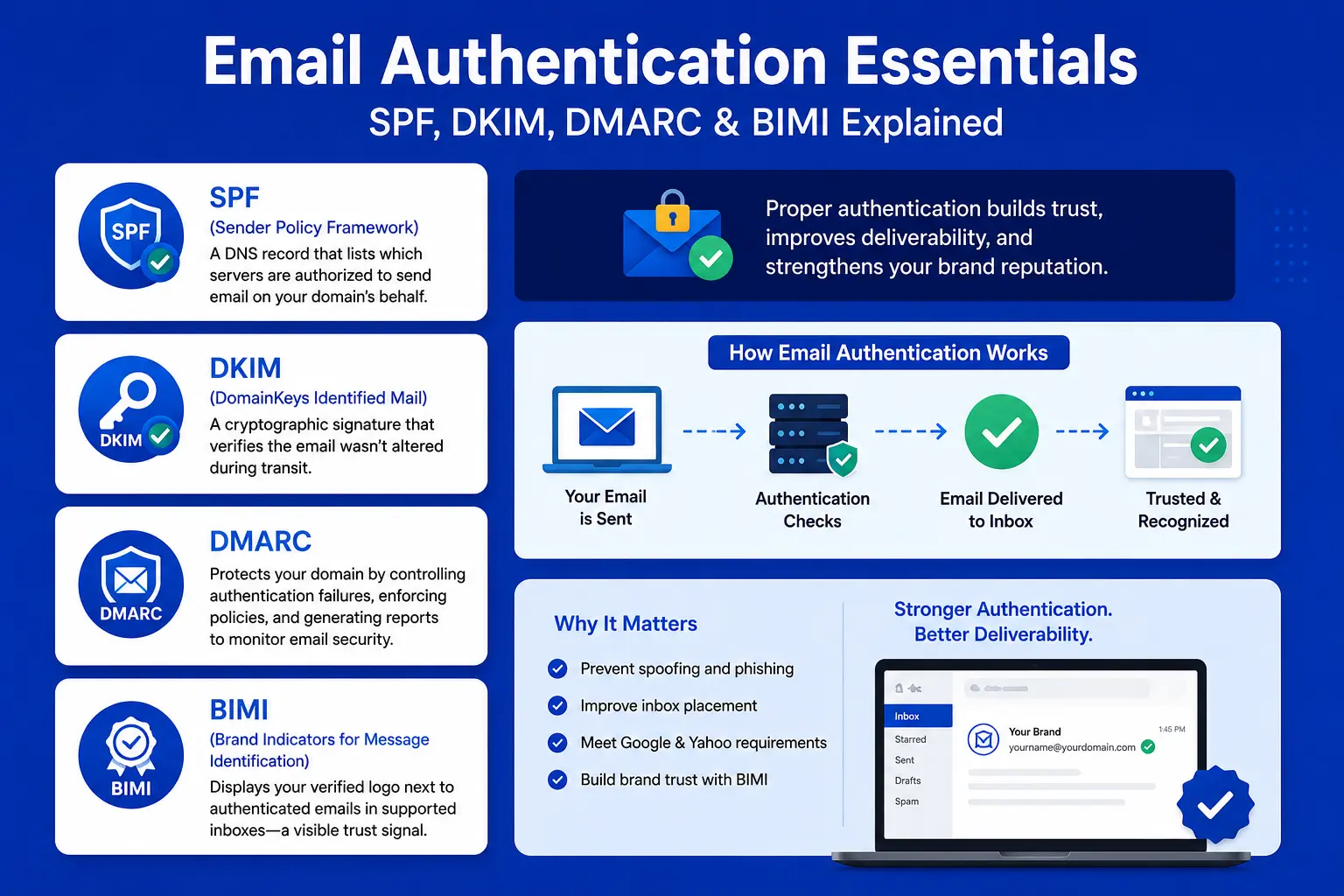
As of 2024, Google and Yahoo require bulk senders to properly configure all three protocols, or mail gets rejected or sent to spam outright.
-
SPF (Sender Policy Framework) - a DNS record listing which servers are authorized to send on your domain's behalf
-
DKIM (DomainKeys Identified Mail) - a cryptographic signature proving the message wasn't altered in transit
-
DMARC protects email communication by controlling authentication failures, enforcing verification policies, and generating comprehensive reports to monitor domain security.
A growing number of senders are also adopting BIMI (Brand Indicators for Message Identification), which displays your verified logo next to authenticated emails in supporting inboxes - a trust signal, though it requires a valid DMARC policy at enforcement first.
Blacklists And Blocklists: What They Mean For Inbox Placement
A blacklist (or blocklist) is a database of IPs or domains flagged for spam-like sending behavior. Landing on one doesn't guarantee every email fails, but it significantly raises the odds of spam-folder placement at providers that consult that list. Recovery typically requires fixing the underlying cause - not just requesting delisting - or you'll land right back on it.
Engagement Signals: Opens, Replies, And Deletions Without Reading
Modern filters weight behavioral engagement heavily. Emails that get opened, read, and clicked signal relevance; emails that get deleted unread or ignored repeatedly signal the opposite. This is why sending to a large but disengaged segment can actively damage deliverability for your entire list, not just that segment.
Bounce Rates And What They Signal To Mailbox Providers
Bounces come in two types: hard bounces (permanent - the address doesn't exist) and soft bounces (temporary - a full inbox or server issue). Validity's 2025 data revealed that brands limiting bounce rates to less than 1.5% enjoy 10–12% higher inbox placement, since fewer bounces demonstrate effective list hygiene and verification.
Spam Complaint Rates And Why They Matter More Than You Think
A spam complaint - a recipient clicking "report spam" instead of unsubscribing - carries far more weight than a single unsubscribe. Even a complaint rate around 0.1% (1 per 1,000 sends) can trigger increased scrutiny from major mailbox providers. This is precisely why a visible, one-click unsubscribe link protects you: it gives frustrated recipients an easier path than hitting "report spam."
Content Signals: Image-To-Text Ratio, Broken Links, And HTML Issues
Filters evaluate the structure of the email itself, not just the sender history:
-
Image-to-text ratio - A message containing mostly one big visual and almost no text can easily trigger spam-like impressions.
-
Broken links or mismatched display/actual URLs - deceptive-looking links are a strong spam signal
-
URL reputation - Connecting your email to a domain marked in spam records can negatively affect its credibility.
-
Messy HTML - Invalid HTML, complex table layouts, or Microsoft Word formatting can increase the chances of emails landing in spam.
Trigger Words: Do They Still Matter In 2026?
Words alone rarely determine placement for a legitimate sender with a solid reputation - but they're not irrelevant either. Financial-fraud-adjacent phrases like "verify your account" or "guaranteed income" mimic phishing language closely enough that filters treat them as high-risk regardless of sender history. Everyday marketing words like "free" or "sale" are fine in isolation; the risk comes from stacking multiple urgency or scarcity phrases in one send, especially from a domain with a thin sending history. Treat word lists as one small QA signal, not the primary diagnosis.
Sending Frequency And Volume Spikes
A sudden jump in send volume - especially from a new domain or IP - looks like spam-like behavior to filters, even if it's a legitimate campaign. This is exactly why IP and domain warm-up exists as a deliberate, gradual process rather than a launch formality.
Shared IP vs. How to Pick the Right Dedicated IP
|
Factor |
Shared IP |
Dedicated IP |
|
Reputation control |
Shared with other senders on the pool |
Fully your own |
|
Best for |
Lower-volume senders, new programs |
High-volume senders (100k+/month) |
|
Setup effort |
Minimal |
Requires proper warm-up |
|
Risk |
Other senders' bad behavior can affect you |
You control the outcome entirely |
Email Warm-Up: Building Trust With A New Domain Or IP
Warm-up means gradually increasing send volume on a new domain or IP over roughly 2–4 weeks, starting with your most engaged subscribers first. Skipping this step is one of the most common - and most avoidable - causes of a brand-new sending domain landing almost entirely in spam during its first campaigns.
How Businesses Can Improve Inbox Placement
If you want lasting email performance, first maintain a high-quality mailing list, then configure domain authentication correctly, and finally communicate only with engaged recipients who welcome your messages.
List Hygiene: Why A Smaller, Cleaner List Outperforms A Bigger One
I've seen this exact scenario dozens of times: a business hesitant to remove 30% of a "big" list, only to watch deliverability recover almost immediately once they finally do. A well-maintained subscriber base of interested readers repeatedly outperforms a larger collection of dormant email addresses.
Double Opt-In vs. Single Opt-In
Double opt-in requires a subscriber to confirm via a follow-up email before joining your list. It produces a smaller list, but a meaningfully more engaged and lower-complaint one - which pays off in deliverability over time, especially for cold or purchased-adjacent traffic sources.
Precision Audience Selection For Better Deliverability, Beyond Marketing Alone
Do you know effective segmentation isn't just about sending relevant emails; it plays a key role in protecting your sender reputation. Industry experts recommend targeting inactive subscribers with re-engagement campaigns rather than emailing your full audience, protecting engagement rates among loyal readers.
Personalization's Role In Engagement-Based Filtering
Since engagement is a core reputation signal, personalization that actually increases opens and clicks indirectly improves deliverability, not just conversion. This is one of the most underrated connections in email strategy - personalization and deliverability aren't separate workstreams.
Getting Authentication Right The First Time
Set up SPF, DKIM, and DMARC before your first meaningful send, not after a deliverability problem appears. Start your DMARC policy at "none" (monitor-only) to see what's happening, then move to "quarantine" and eventually "reject" once you've confirmed legitimate mail is passing.
Domain Warming Best Practices
Warm up in this general order: send first to your most engaged recent subscribers, increase volume gradually (roughly doubling every few days rather than jumping straight to full volume), and monitor bounce and complaint rates daily during the process.
Engagement Strategies That Rebuild Sender Trust
If reputation has already slipped, the fix is the same principle in reverse: temporarily narrow sends to your most engaged segment, let positive engagement rebuild trust, then gradually widen back out.
Deliverability Monitoring: Tools And Metrics To Watch
Ongoing monitoring should track inbox placement rate, bounce rate, spam complaint rate, and blocklist status - not just open and click rates from your ESP dashboard, which don't reveal spam-folder placement on their own.
Review Inbox Readiness And Spam Risks Prior To Sending Emails
Pre-send testing tools can flag likely spam triggers, broken links, and rendering issues across major inbox providers before a campaign goes out to your full list - catching avoidable mistakes before they cost you reputation.
A/B Testing For Deliverability, Not Just Conversion
Most marketers A/B test subject lines for opens. Fewer test structural variables - send time, sender name format, or plain-text vs. HTML - for their effect on spam-folder placement specifically.
Removing Inactive Subscribers Without Losing Revenue
A structured sunset flow - a final, honest re-engagement attempt followed by removal if there's no response - protects your reputation without abruptly cutting revenue-generating contacts who simply haven't engaged recently for unrelated reasons.
Email Campaign Best Practices That Protect Deliverability
Best practices that protect inbox placement and best practices that improve conversion are largely the same thing - relevant, honest, well-structured emails perform better on both fronts simultaneously.
Email Writing Best Practices
Keep copy conversational and specific.Flashy, ambiguous claims trigger skepticism in spam filters and people; straightforward, evidence-based language inspires trust across both.
Subject Line Best Practices
Put accuracy and directness first, avoiding gimmicks and excessive urgency cues. Avoid combining multiple pressure tactics ("Urgent - Act Now - Limited Time") in one line; filters and recipients both read that as manipulation.
Preview Text Best Practices
Preview text should extend the subject line with new information, not repeat it - and should never be left blank, since that just pulls unpredictable content like an image alt-tag.
CTA Best Practices
One clear call-to-action outperforms multiple competing ones. Buttons generally outperform plain text links, though a backup text link protects against rendering issues in stricter mail clients.
Mobile Optimization
Most opens now happen on mobile. Single-column layouts, 14px+ font sizes, and thumb-sized tap targets aren't optional polish anymore - they're baseline requirements.
Accessibility Considerations
Alt text on every image, sufficient color contrast, and a logical reading order for screen readers aren't just inclusive practice - they also improve rendering resilience when images are blocked by default, which is increasingly common.
Design Recommendations That Reduce Spam Risk
Keep every email thoughtfully structured by balancing visual elements with real written content, steering clear of image-heavy layouts, and reviewing the HTML instead of using untouched files from design applications.
Plain-Text vs. HTML: Which Performs Better
Plain-text often builds trust for relationship-style sends (founder updates, personal outreach) precisely because it doesn't look like a promotional blast. HTML is better suited to branded newsletters and promotional campaigns where visual structure adds value. Effective strategies combine both, tailored to each campaign's objective.
Compliance Requirements: CAN-SPAM, GDPR, And Consent
CAN-SPAM (US) requires accurate sender information, no deceptive subject lines, and a working unsubscribe honored within 10 business days. GDPR (EU) requires clear, affirmative consent before sending, plus the right to be forgotten. Both matter for more than legal risk - permission-based sending is directly tied to the engagement signals that protect deliverability.
Email Samples And Templates
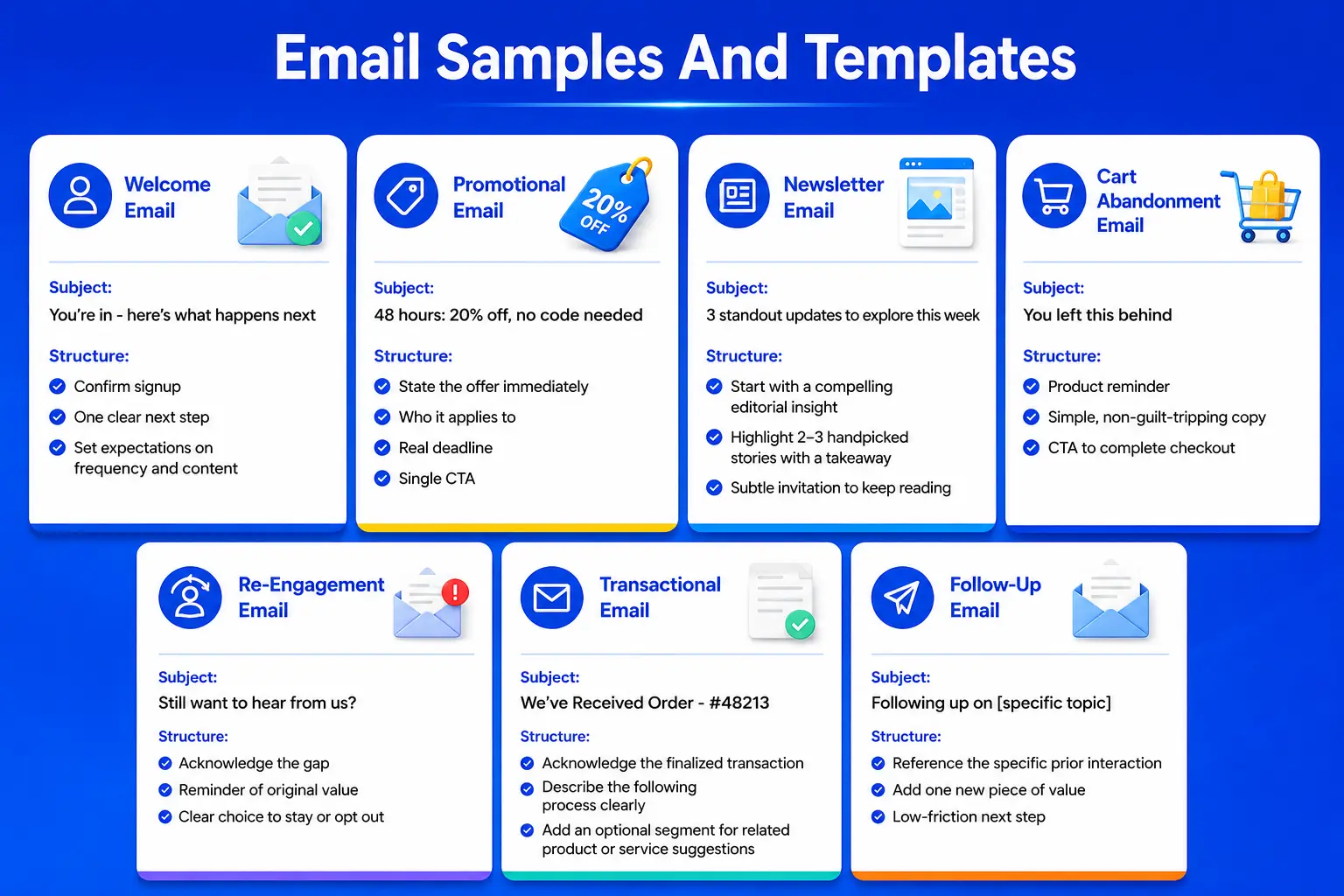
Below are structural templates for the highest-frequency email types every deliverability-conscious program needs, built around clarity and genuine relevance rather than aggressive promotional language.
Welcome Email Sample
Subject: You're in - here's what happens next
Structure: Confirm signup → one clear next step → set expectations on frequency and content.
Promotional Email Sample
Subject: 48 hours: 20% off, no code needed
Structure: State the offer immediately → who it applies to → real deadline → single CTA. Avoid stacking urgency language beyond one clear statement.
Newsletter Sample
Subject: 3 standout updates to explore this week
Structure: Start with a compelling editorial insight → highlight 2–3 handpicked stories with a brief "why it's important" takeaway → finish with a subtle invitation to keep reading. .
Cart Abandonment Email Sample
Subject: You left this behind
Structure: Product reminder → simple, non-guilt-tripping copy → CTA to complete checkout.
Re-Engagement Email Sample
Subject: Still want to hear from us?
Structure: Honest acknowledgment of the gap → reminder of original value → clear choice to stay or opt out.
Transactional Email Sample
Subject: We've Received Order - #48213
Structure: Lead by acknowledging the finalized transaction → describe the following process clearly → add an optional segment for related product or service suggestions.
Follow-Up Email Sample
Subject: Following up on [specific topic]
Structure: Reference the specific prior interaction → add one new piece of value → low-friction next step.
Why Businesses Are Investing In Email Marketing Today
Email remains the highest-ROI owned channel - averaging $36 in revenue for every $1 spent (Litmus / HubSpot, 2025) - precisely as paid acquisition costs climb and algorithm-dependent organic reach keeps shrinking.
Rising Paid Advertising Costs
Paid social and search costs have trended upward for years, while email sending costs remain comparatively flat and predictable, making the channel's ROI advantage widen rather than shrink over time.
Declining Organic Social Reach
Organic reach on most social platforms is a fraction of what it was a decade ago, since algorithms prioritize paid promotion and platform-native content over brand posts reaching their full following.
The Advantage Of An Owned Audience
Your email list is portable and fully yours. No algorithm decides who sees your message, and no platform policy change can suddenly cut off access to your audience.
First-Party Data And Its Growing Importance
As third-party cookies and cross-app tracking keep getting restricted, the behavioral and preference data collected through email - opens, clicks, purchase triggers - becomes one of the most reliable first-party data sources a business owns directly.
Customer Retention Through Email
Email is disproportionately effective for retention compared to acquisition-focused channels, since it supports the ongoing relationship after the first purchase rather than just the initial conversion.
Marketing Automation's Role In Scaling Email ROI
Omnisend's 2025 eCommerce Marketing Report found automated messages made up just 2% of total sends but drove 37% of email-attributed sales - the clearest evidence that automation, not one-off campaigns, is where most of the revenue actually lives.
AI-Powered Personalization
AI-assisted personalization is increasingly used to tailor subject lines, send times, and content blocks at the individual subscriber level - though the strongest programs still keep a human reviewing tone and accuracy before sending, since AI-generated copy without oversight can read as generic or, worse, factually off.
Best Time To Send Marketing Emails
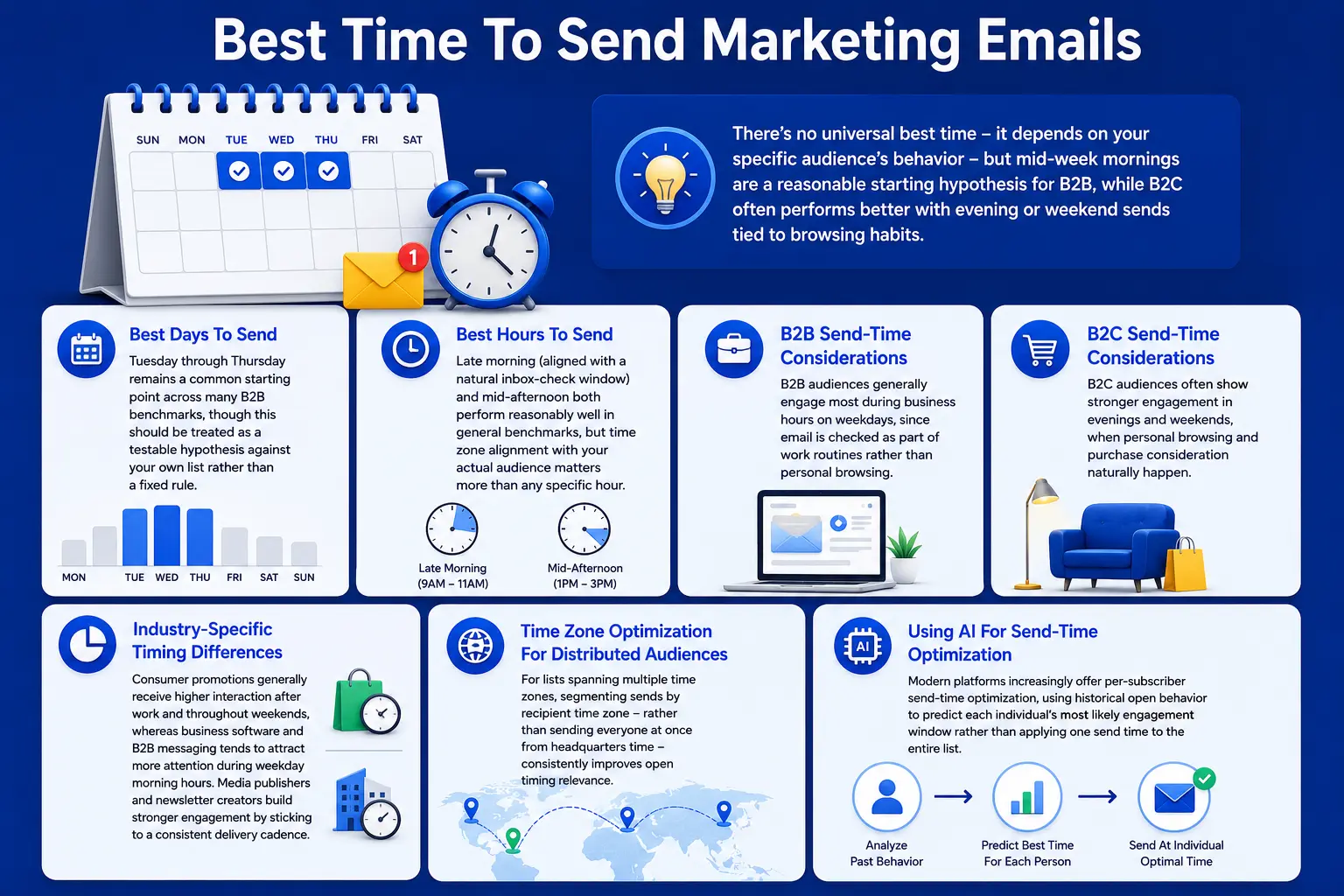
There's no universal best time - it depends on your specific audience's behavior - but mid-week mornings are a reasonable starting hypothesis for B2B, while B2C often performs better with evening or weekend sends tied to browsing habits.
Best Days To Send
Tuesday through Thursday remains a common starting point across many B2B benchmarks, though this should be treated as a testable hypothesis against your own list rather than a fixed rule.
Best Hours To Send
Late morning (aligned with a natural inbox-check window) and mid-afternoon both perform reasonably well in general benchmarks, but time zone alignment with your actual audience matters more than any specific hour.
B2B Send-Time Considerations
B2B audiences generally engage most during business hours on weekdays, since email is checked as part of work routines rather than personal browsing.
B2C Send-Time Considerations
B2C audiences often show stronger engagement in evenings and weekends, when personal browsing and purchase consideration naturally happen.
Industry-Specific Timing Differences
Consumer promotions generally receive higher interaction after work and throughout weekends, whereas business software and B2B messaging tends to attract more attention during weekday morning hours. Media publishers and newsletter creators build stronger engagement by sticking to a consistent delivery cadence.
Time Zone Optimization For Distributed Audiences
For lists spanning multiple time zones, segmenting sends by recipient time zone - rather than sending everyone at once from headquarters time - consistently improves open timing relevance.
Using AI For Send-Time Optimization
Modern platforms increasingly offer per-subscriber send-time optimization, using historical open behavior to predict each individual's most likely engagement window rather than applying one send time to the entire list.
Email Marketing Across The Customer Journey
Email supports every stage of the customer lifecycle, but only when each send is mapped to the recipient's actual stage - sending promotional content to a brand-new subscriber or educational content to a loyal repeat customer both waste the channel's potential.
Awareness Stage Email
Educational newsletters and welcome sequences that introduce your brand without asking for a sale yet.
Consideration Stage Email
Case studies, comparison content, and product education that build trust while the subscriber evaluates options.
Conversion Stage Email
Time-bound offers, cart recovery, and demo-request nudges aimed at a subscriber who's already warm.
Onboarding Email
Welcome journeys designed to help first-time users experience meaningful results faster, building confidence and reducing drop-offs.
Retention Email
Regular value-driven content that keeps existing customers engaged between purchases or renewal cycles.
Upselling And Cross-Selling Email
Recommendations based on actual purchase or usage history, sent close to a natural decision point rather than as generic promotional blasts.
Win-Back Campaigns
A structured sequence - often with an escalating incentive - aimed specifically at subscribers or customers who've gone quiet before removing them from active sending.
Building Long-Term Customer Loyalty Through Email
Consistent, genuinely useful communication over time - not just transactional and promotional sends - is what turns a subscriber into a long-term advocate rather than a one-time buyer.
Comparing Email Marketing Platforms For Deliverability
Boldinbox, Mailchimp, and Brevo differ meaningfully in deliverability infrastructure, automation depth, and pricing scalability - the right choice depends on list size, technical needs, and how much weight you place on deliverability tooling specifically.
Boldinbox
Pros: Deliverability-focused infrastructure with built-in reputation and inbox placement monitoring; automation workflows designed around funnel-stage mapping; transparent revenue-per-campaign reporting.
Cons: Smaller third-party integration marketplace than the largest legacy platforms; very high-volume enterprise sending may require custom onboarding.
Best suited for: Growth-focused mid-market businesses prioritizing deliverability and behavioral automation.
Deliverability: Strong - built-in monitoring and warm-up guidance.
Automation: Advanced, funnel-based branching.
Ease of use: Moderate learning curve, geared toward marketers who want automation depth.
Pricing: Predictable scaling.
Scalability: Strong at mid-market to upper-mid-market volume.
Mailchimp
Pros: Recognized worldwide, rich collection of customizable templates, reliable retail integrations, beginner-friendly experience.
Cons: Growing contact lists can significantly increase expenses, advanced automation capabilities are more restricted than purpose-built solutions, and large-scale sending may experience uneven deliverability in shared environments.
Best suited for: Small businesses and beginners wanting an accessible, well-documented platform.
Deliverability: Standard, shared-infrastructure dependent.
Automation: Moderate.
Ease of use: High - beginner-friendly.
Pricing: Rises quickly as contact count grows.
Scalability: Good at small scale, less cost-efficient at larger scale.
Brevo
Pros: Competitive pricing at lower volumes, combines email with SMS and basic CRM tools, reasonable automation builder for the price.
Cons: Advanced segmentation and reporting are less mature than higher-tier competitors; some users report a learning curve in the automation interface.
Best suited for: Budget-conscious small businesses wanting multi-channel basics in one tool.
Deliverability: Standard.
Automation: Moderate.
Ease of use: Moderate.
Pricing: Strong value at low volume.
Scalability: Reasonable at small-to-mid volume; less proven at high enterprise scale.
|
Factor |
Boldinbox |
Mailchimp |
Brevo |
|
Deliverability tooling |
Built-in, transparent |
Standard |
Standard |
|
Automation depth |
Advanced |
Moderate |
Moderate |
|
Best fit |
Growth-focused mid-market |
Beginners, small ecommerce |
Budget-conscious small business |
|
Pricing scalability |
Predictable |
Rises quickly |
Strong at low volume |
Email Deliverability Checklist
Assess your campaign from start to finish using this checklist before assuming that inbox placement problems are caused by your content.
Campaign planning: Define the funnel stage and goal for this specific send before writing copy.
Audience segmentation: Confirm the send is going to a relevant, engaged segment - not the full list by default.
Compliance checklist: Accurate sender info, honest subject line, working unsubscribe link, documented consent basis.
Deliverability checklist: SPF, DKIM, and DMARC configured and passing; sending domain warmed if new; no active blocklist listings.
Testing checklist: Spam score check, rendering test across major clients, all links verified working.
Performance metrics to monitor: Inbox placement rate, click-to-open rate, bounce rate, spam complaint rate - not open rate alone.
Common mistakes to avoid: Sending to the full list regardless of relevance, skipping warm-up on a new domain, ignoring complaint rate until it's already a problem, treating open rate as the primary success metric post-MPP.
FAQs
1. Why do emails suddenly go to spam after performing fine before?
If metrics suddenly weaken, the cause is usually identifiable. Common factors include aggressive sending spikes, increased delivery complaints or bounces, broken authentication records after technical migrations, or content changes that cause spam filters to assess your emails in a different way.
2. Can authenticated emails still land in spam?
Yes. SPF, DKIM, and DMARC prove you are who you claim to be - they don't guarantee inbox placement on their own. Engagement, list quality, and content signals still matter even with perfect authentication.
3. How long does sender reputation take to improve?
There's no fixed timeline, but meaningful recovery typically takes weeks rather than days, since it depends on rebuilding a consistent pattern of positive engagement, not a single good send.
4. Does using images increase spam risk?
Images alone aren't inherently risky, but an email that's almost entirely image with little real text mimics a common spam pattern and can raise scrutiny - balance is what matters.
5. How can I check my email reputation?
Sender reputation and blocklist-monitoring tools, along with pre-send spam testing tools, can show your current standing before a problem becomes visible in campaign performance.
6. Why do Gmail and Outlook evaluate incoming emails using different filtering methods?
No two mailbox providers evaluate emails in exactly the same way. Each uses its own mix of reputation metrics, engagement patterns, and content analysis, causing the very same email to perform differently from one platform to another.
7. What spam score is acceptable?
Most pre-send testing tools use their own scoring scale rather than a universal standard, so treat the score as a directional QA signal to catch obvious issues, not a precise predictor of real-world inbox placement.
8. How Frequently Remove Inactive Subscribers?
A quarterly review is a reasonable baseline for most programs, removing hard bounces immediately and evaluating long-term inactive subscribers for a re-engagement or sunset flow each cycle.
Sources referenced: Validity 2025 Email Deliverability Benchmark Report, Litmus 2025–2026 State of Email Reports, HubSpot 2026 State of Marketing Report, Omnisend 2025 eCommerce Marketing Report, Statista (spam and email volume data).
Tags: Best Email Deliverability Practices, How To Keep Emails Out Of Spam, What Causes Emails To Go To Spam, How To Improve Inbox Placement Rate, Email Authentication For Better Deliverability, How To Fix Poor Sender Reputation, Email Deliverability Checklist For Businesses, Boldinbox Email Marketing.
Table Of Contents
- What Actually Decides Whether An Email Reaches The Inbox
- How Businesses Can Improve Inbox Placement
- Email Campaign Best Practices That Protect Deliverability
- Email Samples And Templates
- Why Businesses Are Investing In Email Marketing Today
- Best Time To Send Marketing Emails
- Email Marketing Across The Customer Journey
- Comparing Email Marketing Platforms For Deliverability
- Email Deliverability Checklist
- FAQs